


Beat Maker - Drum Pad Pro
4.829.00 Reviews
App Specs
- Version
- 1.0.6
- Updated On
- License
- Free
- Downloads
- 1,000,000+
- Developer
- Smart Experiences
- Categories
- Music & Audio
- Platform
- Android
Screenshots
 Analysis by AppCompare
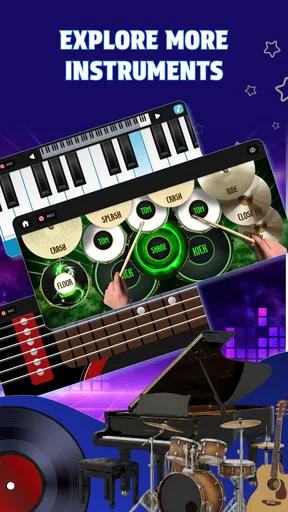
On my first few days with Beat Maker - Drum Pad Pro, the appeal is easy to understand: a phone becomes a place to tap out musical ideas instead of just listening to them. The app brings beat-making together with drum, guitar, and piano playing, so I can move between rhythmic tapping and trying a simple melodic part without switching to a different kind of music app. That makes it a tempting choice for a commute, a quiet break, or a moment when a tune appears in my head and I want to explore it.
Why the first week feels inviting
The low barrier to entry is the strongest reason to try it. I don’t need to know music theory to start tapping a pattern, and a touch screen makes experimenting feel casual rather than like sitting down for a formal production session. For someone who has never used a beat-making app, that matters: the first step is playful, and the app’s focus on several familiar instruments offers more than a single drum-pad activity.
I’d treat those early sessions as exploration, not as a promise that every tap will become a finished track. Try a steady pulse first, then add a contrasting rhythm or a few notes. That small constraint can make the screen feel less overwhelming and helps me notice whether I enjoy building patterns or mainly enjoy the instant response of tapping. The difference is useful when deciding whether this belongs in a regular creative routine.
There is also a practical distinction between making sound and making music. A quick burst of taps can be fun while waiting for a friend, but a musical idea usually needs repetition and a little editing in your own head. I find it helpful to begin with one simple question—what mood should this rhythm have?—rather than trying to invent a complete song immediately. That turns casual play into a small, satisfying exercise without raising the stakes.
Does it earn a place after the novelty?
After the first-week excitement, lasting value depends on whether I return with a reason. A pocket-sized music tool can become a useful habit if I use it to test a rhythm before rehearsal, explore a melody away from an instrument, or give myself a creative break that doesn’t involve scrolling through another feed. The mix of beat-making and drum, guitar, and piano play gives those short sessions a few different directions.
A realistic use case is a lunch break: I have a few minutes, tap a rhythm, and try a piano or guitar idea over it. I can leave with a musical sketch in my mind even if I’m not producing a polished song on the spot. For a beginner, repeating a simple pattern can also build a feel for timing. For a more experienced musician, it may be more useful as a quick idea-starter than as the center of a full recording workflow.
That distinction is important when comparing it with the usual alternatives. A dedicated digital audio workstation is the better choice when I need detailed arrangement, editing, mixing, or a dependable path from an idea to a finished release. A metronome or instrument-learning app is more focused if my only goal is timing practice or structured lessons. This app sits in the playful middle: more hands-on than a music player, but not something I would choose automatically for a complex production job.
Worth Reading Before You Choose

EA SPORTS FC Mobile 26 Is a Bigger Football Game, but It Takes Time

Flipboard Shows What News Apps Must Do Beyond the Feed

Switching to Android Auto Means Rethinking Your Driving Routine

Google Calendar Makes a Crowded Week Easier to Manage

Ludo King Makes the Most of the Minutes Between Plans

Baby Panda World Brings Quick Play to Modern Phones, but Its Game Library Feels Busy
To get more out of it, I’d keep a small personal routine rather than waiting for inspiration. For example, I could spend one short session making a rhythm, then use another to try a different instrument against the same pulse. Reusing an idea is a better test of staying power than endlessly starting from scratch: if I still want to revisit a pattern, the app is serving my creativity rather than just supplying a novelty.
Maintenance, limits, and who should skip it
Its maintenance burden appears modest in the everyday sense: I can open a music app for a short session without preparing a studio or gathering instruments. Still, a mobile screen is a cramped place for careful performance. Taps that feel expressive at first may become awkward when I want precise timing or subtle control, and playing through a phone speaker is not the same as listening critically to music on a dedicated setup. Those trade-offs matter more as my ambitions grow.
Another useful habit is to decide what counts as a successful session before I begin. If I expect a finished composition every time, the app may feel limiting; if I aim to test one groove or find a melody worth remembering, a few minutes can be enough. I would also avoid treating a lively sound as proof that an idea is arranged well. Listening back with fresh ears, where possible, is a better way to judge whether a rhythm actually works.
This is a good fit for curious beginners, casual rhythm-makers, and musicians who want a low-pressure place to try ideas between more focused practice sessions. I’d skip it if I needed precise production controls, structured instrument lessons, or a serious replacement for a computer-based studio. Those needs call for tools designed around depth and control, not quick interaction on a phone.
Before settling into a routine, I’d also ask what I want to do with the ideas afterward. If the goal is simply to play and experiment, a self-contained mobile session may be enough. If the goal is to develop a track for a larger project, I should choose a workflow that supports the editing and handoff I need. That expectation check can prevent frustration: the app is most appealing when I value immediate musical play, not when I expect a compact phone screen to stand in for every stage of production.
Getting Started with Beat Maker - Drum Pad Pro
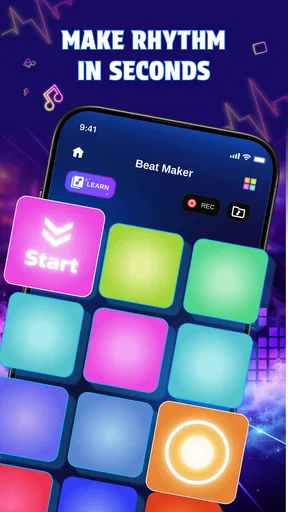
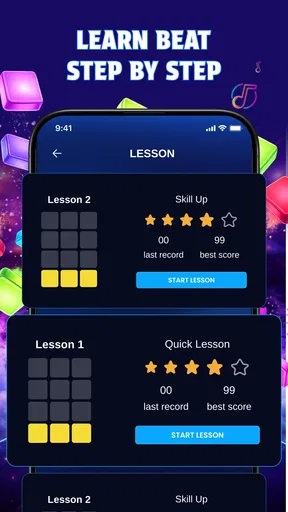
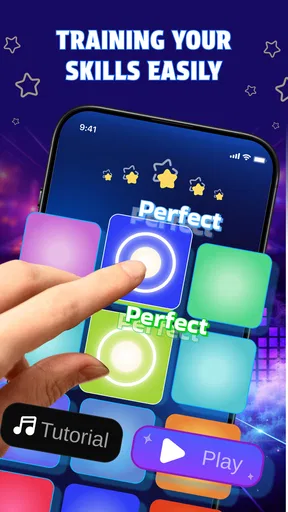
From the moment I downloaded Beat Maker - Drum Pad Pro, the setup was a breeze. The interface is sleek and intuitive, making it easy even for beginners to jump right in. The app offers a comprehensive tutorial that guides you through the basics, so don't worry if you're new to beat-making. You'll be tapping out sick rhythms in no time!
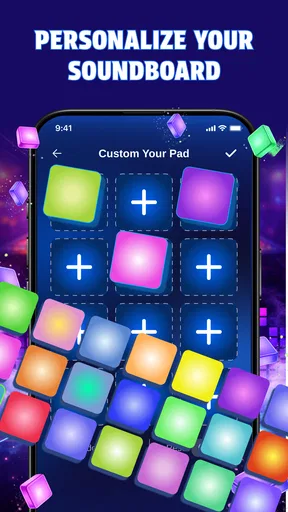
The main screen is organized into several pads, each representing different sounds and instruments. I loved how customizable everything is; you can choose from a variety of sound packs ranging from hip-hop to electronic dance music. The sound quality is top-notch, and I was genuinely impressed by how professional it all sounds.
Diving Deeper into Features
One of the standout features for me is the loop creation tool. This allows you to layer sounds and create complex compositions with ease. I found myself lost in experimenting with different combinations, creating everything from catchy hooks to intricate drum patterns.
Another fantastic feature is the live recording option. You can record your sessions on the fly, capturing those spontaneous moments of creativity. It's perfect for when inspiration strikes, and you don't want to lose that perfect beat.
The app also includes a built-in sequencer, which is a real game-changer for anyone serious about music production. You can arrange your sounds into full tracks and even export them to share with friends or upload online. The possibilities are endless!
Usability and Design
The developers have done a stellar job with the design. The app runs smoothly, and I didn't experience any lags or crashes during my use. The graphics are vibrant, and the layout is user-friendly, catering to both casual users and seasoned producers.
I must mention the community aspect as well. The app allows you to connect with other users, sharing beats and receiving feedback. It's a supportive environment that can really help you grow as a beat maker.
A realistic routine, not just a novelty
For a regular routine, I would keep the goal small enough to fit around real life. On a bus ride, I might tap out a rhythm and save the idea mentally rather than trying to arrange an entire piece while distracted. At home, I could return to the same rhythm and try a different instrument over it. This two-step approach makes a short session more useful and gives me a way to tell whether the app is becoming a creative tool or merely a passing diversion.
The range of instruments is especially handy when I want to test whether a beat needs a melodic counterpoint. I can start with percussion, then switch to a guitar or piano part to imagine how the rhythm might support a song. That is not a substitute for learning an instrument, but it can help a beginner notice how rhythm and melody relate. Someone who already plays may instead use it to sketch a broad idea before moving to their usual instrument.
There is a trade-off in that flexibility. Moving among different sounds invites experimentation, but it can also encourage me to chase novelty instead of developing one pattern. I get more out of the app when I deliberately reuse a rhythm, change one element, and compare the result. That simple practice makes it easier to hear what changed and keeps a session from becoming a string of unrelated taps.
What the ratings and price mean in context
As a free music and audio app from Smart Experiences, it is easy to try without making a purchase decision first. It has a 4.5 average from around 4,200 ratings and more than a million installs, which suggests that plenty of people have given it a chance, though popularity alone cannot tell me whether its approach suits my habits. Its Everyone age rating also makes it broadly approachable for casual use.
The current version is 1.0.5, and the app was released on February 13, 2026. It supports devices running Android 7.0 or later. I would check that minimum before planning to use it on an older phone, especially if I rely on that device for music-making. These practical details do not change the central question: whether tapping and experimenting is enjoyable enough to bring me back.
When choosing between this and a conventional music player, the difference is purpose. A player is for listening to finished music; this is for interacting with sound and trying out ideas. Against a more advanced production app, the balance reverses: a studio tool can offer a deeper route to a finished arrangement, while a compact beat-making app is appealing when I want less setup and a quicker start. I would choose based on the job, not assume one category replaces the other.
When I would keep using it
For me, the lasting case is modest but real: quick, low-pressure music-making that can fit into spare moments. If I enjoy tapping rhythms, testing a melody, and returning to an idea later, the app can earn a place on my phone beyond its first burst of novelty. If I find myself wanting more control than the screen offers, that is a sign to move to a dedicated production tool rather than force this one into the wrong role.
Overall, Beat Maker - Drum Pad Pro is an impressive app that offers a rich experience for anyone interested in music creation. Whether you're a hobbyist looking to have some fun or a serious producer seeking a portable tool, this app has something to offer. The ease of use, combined with professional-grade features, makes it a must-try for music enthusiasts.
So, if you're ready to unleash your inner producer, grab your phone and give Beat Maker - Drum Pad Pro a spin. You might just find your new favorite way to pass the time, and who knows, you might even create the next big hit!
Pros
- Intuitive interface for easy beat creation.
- Wide variety of sound packs available.
- Customizable pads for personalized setup.
- Supports real-time recording and editing.
- Great for both beginners and pros.
Cons
- In-app purchases can add up.
- Limited free sound packs.
- Occasional ads interrupt workflow.
- Requires a good device for smooth performance.
- Lacks advanced editing features.
FAQs for Beat Maker - Drum Pad Pro
What features does Beat Maker - Drum Pad Pro offer?
Beat Maker - Drum Pad Pro is packed with features that cater to both beginners and professional music producers. It offers a wide array of sound packs, customizable drum pads, and real-time effects. Users can create loops, record sessions, and even share their creations directly from the app. Its user-friendly interface makes music production accessible to all skill levels.
Is Beat Maker - Drum Pad Pro suitable for beginners?
Absolutely! Beat Maker - Drum Pad Pro is designed with an intuitive interface that makes it easy for beginners to start creating music. It includes tutorials and a variety of preset sound packs that guide new users through the basics of beat-making. This makes it an excellent starting point for anyone interested in music production.
Can I use Beat Maker - Drum Pad Pro without an internet connection?
Yes, Beat Maker - Drum Pad Pro can be used offline. Once the necessary sound packs and features are downloaded, users can create and edit music without requiring an internet connection. However, an internet connection is needed for downloading new sound packs or sharing your music creations online.
What are the pros and cons of using Beat Maker - Drum Pad Pro?
Pros include an extensive library of sound packs, an easy-to-navigate interface, and the ability to create professional-quality beats. The app also supports sharing directly to social media. On the downside, some users may find in-app purchases necessary to access all features, which could be a drawback for those on a budget.
Are there any in-app purchases or subscriptions in Beat Maker - Drum Pad Pro?
Yes, while Beat Maker - Drum Pad Pro offers many features for free, it does include in-app purchases. Users can buy additional sound packs and effects to expand their music library. There may also be a subscription model that provides access to exclusive content and features, enhancing the overall experience for avid users.


